Best Practices for Implementing Data Platform Services in 2025

It’s 2025, and businesses are leaning hard on data to stay ahead. Data platform services—the tools and systems that manage, store, and analyze all that info—are at the heart of this. Setting them up takes thought and clear steps to get right.

Here’s a rundown of the best ways to make it happen, filled with practical advice from solid sources like Microsoft’s data strategies and what’s working out there in the industry.

Start With a Simple Plan

Before jumping into a data platform, every company needs a basic plan. It’s about knowing what the business is after—better customer details, faster reports, or lower costs. Without this, things can go off the rails quick.

Check what’s already in place: what data’s there, where it’s stored (local or cloud), and how it’s used. This points to the right tools—like Azure Synapse or Microsoft Fabric—and sets a timeline. Microsoft and other experts say matching the setup to business goals keeps it all on track and cuts out wasted effort.

Get Data Moving Smoothly

Shifting data to a new system is a big deal, and it’s got to be smooth. Look at the old setup—databases, files, everything—and sort out what’s moving. Some can transfer as-is, while other parts might need a tweak to fit.

Tools like Azure Data Factory pull data from all over and land it safely in the cloud. Testing’s critical—make sure nothing’s lost and the new system works right. Microsoft’s advice is to secure it with encryption and backups during the move, so there’s no chance of trouble.

Set Up Rules to Keep Data in Check

A data platform won’t help much if the data’s a jumble. Rules—known as governance—keep it organized, safe, and ready to use. Decide who can access what, label sensitive stuff (like customer info), and stick to laws like GDPR.

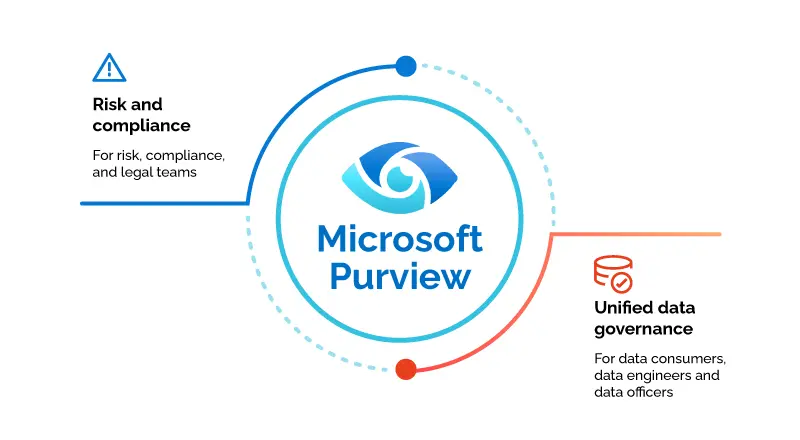
Tools like Azure Purview scan and sort data automatically, saving effort. Regular checks ensure it’s reliable, so teams can trust what they’ve got. Industry reports, like from Gartner, say strong governance is what makes data systems pay off in 2025.

Update Systems With Cloud and Analytics

 

Cloud and Analytics


Old data setups can hold a business back, so updating them is essential. Cloud options—like Azure—bring flexibility and power, cutting hardware costs and letting systems grow with demand. Adding analytics, especially AI, boosts it further—think spotting trends or predicting customer needs. Microsoft Fabric ties storage, processing, and analytics together, speeding things up. Start small—update one area, test it, then expand—following Microsoft’s tried-and-true steps.

SNP Technologies Inc. nails this. Our data platform services use Azure and AI to shift businesses from outdated systems to ones that deliver, keeping everything running strong and efficient.

Make Sure Teams Know the Ropes

Even the best system falls flat if people can’t use it. Training staff—tech crews, analysts, everyone involved—gets them comfortable with the new tools. It’s more than tech tricks; it’s showing how the data helps their day-to-day. Tools like Power BI let teams share reports easily, boosting teamwork. Microsoft suggests keeping everyone in the loop with updates and chats, so the platform becomes part of the routine, not just a sidelined gadget.

Check and Adjust as It Runs

Once the data platform services are rolling, the job isn’t over. Test speed, security, and accuracy to catch issues early. Tools like Azure Monitor keep an eye on performance, flagging slow spots or hiccups. Then tweak as needed—maybe add storage or tighten security—based on what’s happening. This steady care, rooted in industry know-how, keeps things solid for whatever 2025 brings.

For businesses ready to make this happen, SNP Technologies Inc. is a solid choice. Our expertise in data platform services—from moving data to setting rules—helps turn it into a real advantage. Reach out today—let SNP Technologies Inc. boost your data setup for 2025!

Cloud Migration Made Easy: The Role of a Microsoft CSP

Moving a business to the cloud can feel like a mountain to climb. It’s about getting data, apps, and work stuff off office computers and onto the internet. That’s not something you just wing—it needs a plan and some know-how to keep things from breaking.

More and more companies are picking the cloud because it’s flexible and lets them grow. A Microsoft Cloud Solution Provider (CSP) is the helper that makes it less of a chore and more of a win, built around what each business needs. Here’s how they do it, in plain words with real stuff from Microsoft’s CSP program and what’s out there.

Why Cloud Migration Can Feel Messy

Switching to the cloud isn’t always a walk in the park. Old systems don’t always play nice with new cloud setups, moving heaps of data can mean losing bits if you’re not careful, and nobody wants their work to freeze up. Then there are rules—like GDPR or HIPAA—that say you’ve got to keep private info safe the whole time. That’s why trying it alone can be a slog. A Microsoft Cloud Solution Provider steps in with the tools and smarts to smooth it out, especially for Azure, so it’s not such a hassle.

What a Microsoft CSP Really Does

A Microsoft Cloud Solution Provider isn’t just there to sell you cloud access—they’re like a buddy who’s got your back through the whole thing. They’re part of Microsoft’s CSP program, started back in 2015, which lets them take care of everything: planning it out, setting it up, and helping after. Instead of just grabbing something off Microsoft’s shelf, you get real support. They look at what you’ve got, figure out what’s moving, and make a plan that fits your business.

Take Azure Migrate—it’s a free tool they use to peek at your local setup and see what’s good to go. They spot which servers or apps can jump over easy and which need a little fix. With Azure Site Recovery, they move stuff without much interruption. That hands-on help—from licenses to sorting out bumps—is what sets them apart, right from Microsoft’s CSP details.

How They Keep It Simple

The move can seem like a tangle, but a cloud solution provider cuts it into easy chunks. They start by checking what’s there—servers, databases, apps—to see what can go online. Then they figure out the best way: keep it as-is, tweak it a bit, or spruce it up for the cloud. Tools like Azure Database Migration Service shift databases—like SQL Server—without throwing off your day.

They keep data safe with Azure’s handy features, like locking it down and picking who gets in. Licensing stays easy through the CSP program, so you’re not stuck. After it’s set, they use Azure Monitor to watch how it’s running. This clear, one-step-at-a-time way, backed by Microsoft’s tools, makes it less of a headache.

Why Their Skills Make a Difference

What a Microsoft CSP Really Does

Most businesses don’t have cloud experts hanging around, and that’s where a cloud solution provider comes in clutch. CSP teams know Azure like the back of their hand—think networking, security, all that—and they meet Microsoft’s tough rules. They keep up with new bits, like Azure Arc, which links cloud and local stuff together. Their know-how means fewer slip-ups and a quicker move.

SNP Technologies Inc. brings this to life. As a Tier-1 Microsoft Cloud Solution Provider, we’re all about Azure, helping businesses shift with plans that keep things steady. Our Cloud Management Platform gives a simple screen to check and tweak stuff, saving cash while keeping it smooth.

What You Get Out of It

Teaming up with a Microsoft CSP isn’t just about hitting the cloud—it’s about being set for the future. They adjust things to save money and grow easily, using Azure’s stretchy setup. Support sticks around, fixing issues fast. The CSP program mixes Microsoft’s tools with real help for a move that’s practical and smart.

For businesses ready to get going, SNP Technologies Inc. is a solid bet. As a dedicated cloud solution provider, we’ve got the skills and support to make Azure a breeze. Reach out today—SNP Technologies Inc. can turn cloud migration into a simple win!

Future of Data Governance: The Role of Azure Purview in 2025

It’s 2025, and data’s a huge part of keeping a business going. Data governance might sound like a big, fancy word, but it’s really about not letting all that info run wild. Companies have data sitting on office machines, up in clouds like Azure or AWS, and jammed into apps they use all the time.

With rules getting tougher and more on the line, keeping it under control is something they can’t skip. That’s where Azure Purview comes in—it’s a tool that really helps out. Here’s how it works, in a way that’s easy to understand.

Why Data Governance Is a Must Now

Picture a company’s data like a big pile of papers—some in the office, some online, some lost in the mix. That pile’s getting only higher this year, and laws like GDPR or CCPA are saying, sort it out and keep it safe. Data governance is just about getting it organized, locked up, and ready to use. Doing it the old way—by hand—is a pain and full of slip-ups. Businesses need something simpler, and Azure Purview services step in with an easy answer.

How Azure Purview Helps Out

Azure Purview is a Microsoft tool that rounds up all your data and makes it clear as day. It doesn’t care if it’s on your office setup, in Azure, AWS, Google Cloud, or some app—it grabs everything. Azure Purview services look it over, make a list of what’s there, and tell you what it’s all about. It’s great at finding stuff you don’t want everyone seeing—like customer names or bank info—without you having to dig around.

Say your staff details are spread out all over. Azure Purview services spot them, flag them as private, and point out where they’re at. With companies mixing cloud and on-site stuff, that’s a real lifesaver. Microsoft says it’s got smart tricks to do this quick and right, so you’re not stuck guessing.

Keeping Data Safe and Following the Rules

Keep data safe from Azure Purview

Security’s a big deal in 2025—one mess-up can hurt a lot and make people doubt you. Regulators are watching closely too. Azure Purview services help by keeping a record of where data’s been—something called data lineage. It’s like a little trail map. Need to show an auditor you’re on the up-and-up? That map’s right there.

It also puts up some fences. If the data’s personal, Azure Purview services mark it and keep it for just the right eyes. That’s a big help for places like hospitals or banks with strict rules. Microsoft hooks it up with Azure’s safety gear, so it’s a solid wall around your stuff.

Making Data Something You Can Use

Here’s the neat part: Azure Purview isn’t just about dodging trouble—it lets you put your data to work. In 2025, teams need info they can trust to plan things or spot what’s next. Azure Purview services give you a list that’s simple to look at, so everyone knows what’s there and it’s good to go. No more wrestling with a big mess.

SNP Technologies Inc. jumps in here. Our Azure Purview services help businesses sort their data, meet rules, and turn it into something valuable—all with a practical, down-to-earth approach.

What’s Next This Year and Beyond

Azure Purview’s only getting bigger. It’s built to handle new things—like AI or smart devices—that’ll change data this year and the years to come. Companies using Azure Purview services now will be set for what’s coming, thanks to how Microsoft keeps it growing.

For businesses wanting to get their data straight, SNP Technologies Inc. is ready to help. Our Azure Purview Services make it easy and set you up to win. Want to take control of your data in 2025? Reach out—SNP Technologies Inc. can help make it a strength, not a stress!

Managing Hybrid Identities with Microsoft Azure

Today, businesses are becoming a combination of on-premises and cloud applications. Users require access to those applications which are hosted both on-premises and in the cloud. Managing users both on-premises and in the cloud poses challenging scenarios.

Microsoft’s hybrid identity solutions span on-premises and cloud-based capabilities, creating a single user identity for authentication and authorization to all resources, regardless of location or device.

Azure AD Connect integrates any user who is present or being created in an on-premise Active Directory to Azure AD. This means you have a single user identity for accessing resources present on-premise, in Azure, O365 & your SaaS applications.

Business Benefits of Hybrid Identities:

  • An increase in productivity by providing access anywhere, anytime
  • Create and manage a single identity for each user across all your data center-based directories, keeping attributes in sync and providing self-service and SSO for users.
  • Keep resources productive with self-service password reset and group management for both data center and cloud-based directories.
  • Organizations have complete visibility and control over security and monitoring to help reduce inappropriate user activity and spot irregularities in user behaviors
  • Enforce strong authentication to sensitive applications and information with conditional access policies and multi-factor authentication.
  • Federate identities to maintain authentication against the data center-based directory.
  • Provide SSO access to hundreds of cloud-based applications.


The Three Hybrid Authentication Solutions:

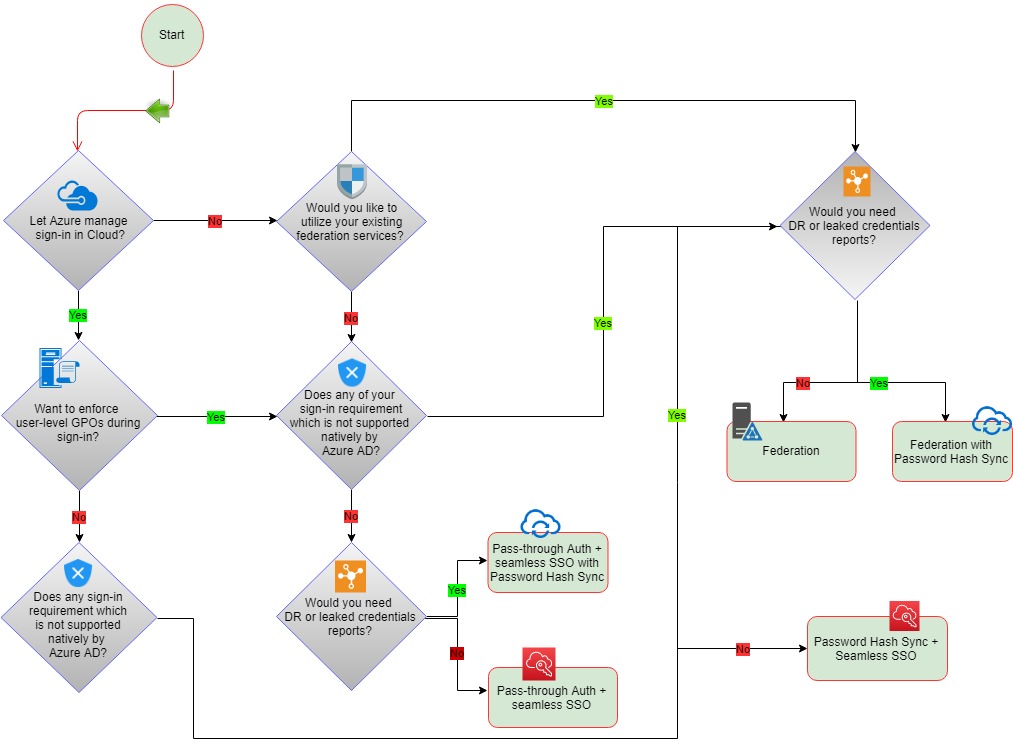
While hybrid identity may seem like a complex issue when it is up and running, it makes accessing data and services both internal and external while collaborating with partners and customers much simpler. To achieve hybrid identity with Azure AD, three authentication methods can be used:

1. Password Hash Synchronization (PHS):

Password hash sync is the simplest way to enable authentication for on-premise AD objects in Azure AD. Users can use their existing on-prem credentials for accessing cloud-based applications on Azure. Active Directory DS stores the password in a hash form which is synced to Azure AD. When a user tries to login to Azure AD, the password is run through a hashing process and the hashed value is matched with the hash value present on Azure AD. If the hash values match, the user is allowed access to the resources.

2. Pass-Through Authentication (PTA):

Azure Active Directory (Azure AD) Pass-through Authentication allows your users to sign in to both on-premises and cloud-based applications using the same password. While deploying the Pass-through Authentication solution, lightweight agents are installed on your existing servers. These agents should have access to the on-premise AD domain controllers and outbound access to the internet. Network traffic is encrypted which is limited to authentication requests only.

3. Federation Authentication (AD FS):

With the Federation authentication method, you can federate your on-premises environment with Azure AD and use this federation for authentication and authorization. This sign-in method ensures that all user authentication occurs on-premises. Azure AD redirects the users to Active Directory Federations Services (ADFS) as the authenticated domain configured as a federated domain. The ADFS server authenticates the user with on-premise AD and returns a security token to authenticate with Azure AD. The configuration of this solution is much complex as it would require one or more ADFS Proxy servers, one or more ADFS Servers and SSL certificates for implementations.

Potential Reference Architecture Diagram:

Why SNP?

SNP Technologies Inc. is a leading provider of innovative technology solutions, specializing in harnessing the power of cloud services to drive business transformation. With a focus on delivering comprehensive solutions in AI, ML, and cloud services, SNP Technologies partners with clients across various industries to enhance operational efficiency and achieve their strategic objectives. We combine elements from our ISO certifications and Microsoft specializationsas well as the most efficient and innovative technology tools and platforms to help our clients become more agile, more customer, and more operationally efficient. For more information, contact us here.

Why you should consider moving your applications to Microsoft Azure

Migrating applications to Microsoft Azure offers a range of benefits that can enhance performance, scalability, and overall efficiency. Here are several compelling reasons to consider making the move:

Scalability and Flexibility

  • On-Demand Resources: Azure allows you to scale your applications up or down based on demand. This flexibility ensures you only pay for what you use, making it easier to handle traffic spikes without overprovisioning.

Global Reach

  • Multiple Data Centers: Azure has a vast network of data centers around the world, enabling you to deploy applications closer to your users. This reduces latency and improves the overall user experience.

Enhanced Security

  • Robust Security Features: Azure provides a comprehensive set of security tools and features, including encryption, identity management, and threat detection. Microsoft’s security expertise helps safeguard your applications and data.

Integration with Existing Tools

  • Seamless Integration: Azure integrates well with Microsoft products and services, such as Office 365, Dynamics 365, and Power BI. This compatibility enhances productivity and streamlines workflows.

Cost Management

  • Flexible Pricing Models: Azure offers various pricing options, including pay-as-you-go and reserved instances, allowing you to choose a model that fits your budget. This helps manage costs while ensuring access to powerful computing resources.

Support for Multiple Programming Languages and Frameworks

  • Diverse Development Environment: Azure supports a wide range of programming languages, frameworks, and platforms, making it suitable for various development needs. This allows developers to use the tools they’re most comfortable with.

Advanced Analytics and AI Capabilities

  • Built-In Analytics Tools: Azure provides access to powerful analytics and artificial intelligence services, enabling you to gain insights from your data and build intelligent applications without extensive infrastructure.

Reliable Backup and Disaster Recovery

  • High Availability: Azure offers built-in backup and disaster recovery solutions to ensure business continuity. This reduces the risk of data loss and downtime, providing peace of mind for critical applications.

DevOps and Continuous Integration/Continuous Deployment (CI/CD)

  • Streamlined Development Process: Azure supports DevOps practices with tools for automated testing, continuous integration, and deployment. This accelerates the development cycle and improves collaboration between development and operations teams.

Sustainability and Compliance

  • Environmentally Friendly: Microsoft is committed to sustainability, with initiatives to reduce carbon emissions and operate data centers using renewable energy. Azure also complies with various regulatory standards, ensuring your applications meet necessary legal requirements.

Conclusion

Migrating your applications to Microsoft Azure can unlock significant benefits, from enhanced scalability and security to advanced analytics and cost management. By leveraging Azure’s comprehensive cloud capabilities, your organization can become more agile, improve operational efficiency, and focus on innovation while Microsoft manages the underlying infrastructure. As the cloud landscape continues to evolve, moving to Azure can position your business for long-term success.

For more information on Microsoft Azure, Contact SNP Technologies here.

How DevOps in the Cloud Improves Application Delivery and Efficiency

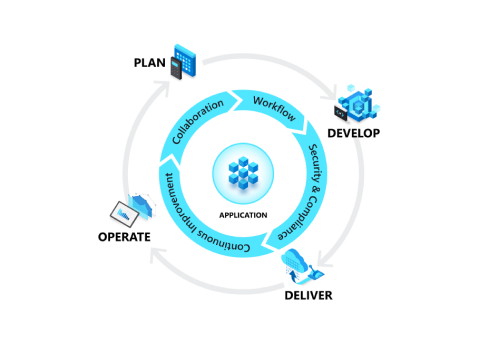
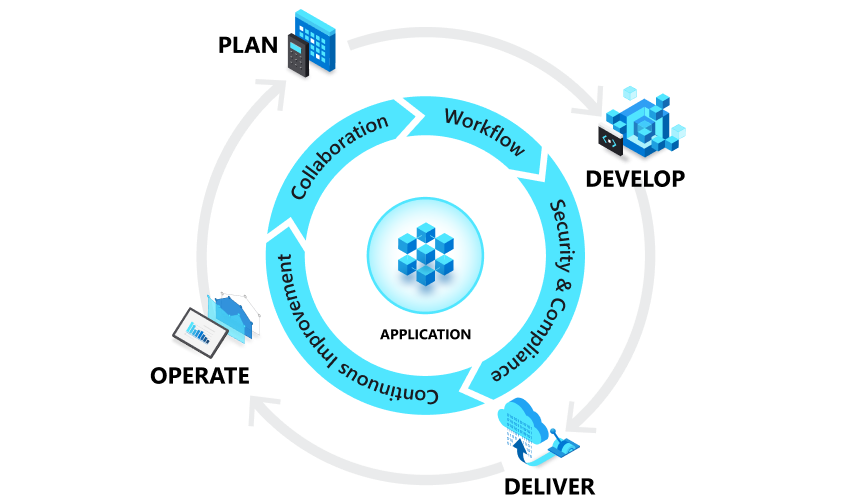
DevOps is a cultural shift and a healthy collaboration between development and operations. There is no single DevOps tool, rather a set consisting of multiple tools that range from version control of source code to application life cycle management. With DevOps, siloed roles like development, IT operations, quality engineering, and security coordinate and collaborate seamlessly.Some of the ways DevOps has proven to increase application delivery and efficiency for our customers include:

Dev & Ops Collaboration:

Raise efficiency, quality, and speed through better development and operations collaboration.

Centralized Source Code Management:

Version control of application source code and multiple team members to work on application code development parallelly, branching strategies improve the team development efforts

Rapid Delivery:

Move to continuous integration (CI), and continuous delivery (CD) with the test, release, and deployment automation process.

Automate Infrastructure: 

Automate as many of your processes as you can through virtualization, and configuration management to add agility to your infrastructure.

Microservices & Containerization: 

Develop and change applications faster and easier by making development, test and production environments more consistent.

Cloud Migration: 

Migrate and deliver applications in the cloud with scalability, resilience, and security.

Visibility

Manage, track, and report end-to-end software delivery for all stakeholders.

Flexibility

Get access to existing toolsets and processes, along with future technologies to help you automate and orchestrate activities.

Security

Get a centralized repository for all security, standards, and compliance policies spanning across functions, tools, and platforms.

Unlimited Scalability

Scale as your business grows and get a single source for sharing control and visibility.

Extensibility

DevOps offers strong integration capabilities that allow easy integration between tools and automation platforms.
For more information on how DevOps can help improve your business’ performance, Contact SNP Technologies here.

How DevOps in the Cloud Improves Application Delivery and Efficiency

Azure Database for MariaDB, MySQL and PostgreSQL – A Fully Managed Service

SNP Technologies brings the power and ease of OpenSource Platform as a Service (PaaS) to your data workloads

Azure Database for MariaDB, MySQL and PostgreSQL services offer fully managed database services built on the proven relational database services foundation which also delivers Azure SQL Database to millions of databases worldwide. Users can provision a new instance in minutes and quickly scale the compute power needed online to respond to their dynamic business needs.

Quickly respond to demand with built-in high availability and scalability, and high-security features to keep your data safe and compliant. Users can provision a new instance in minutes and quickly scale the compute power needed online to respond to their dynamic business needs.

Each of these databases as a service comes with automated patching, the highest level of security & protection, high availability, and is fully supported by Microsoft from the all the way through database engine.

Key Features Include:

  • Built-in high availability
  • Dynamic scaling
  • Meet on-demand fluctuations in performance demand
  • MySQL 5.6 – 8.0 supported version
  • PostgreSQL 9.5-11 supported version
  • MariaDB 10.2-10.3 supported version
  • Limit access by IP Address
  • VNet integration supported
  • Data-in replication for hybrid data and multi-cloud synchronization
  • MySQL Workbench compatible
  • SSL connections supported
  • Server monitoring

Business Benefits:

  • Eliminate hardware costs and reduce administrative costs.
  • Pay-as-you-go with options to scale up or out for greater power with zero interruption.
  • Enterprise-ready open-source database engines.
  • Native integration with Azure PaaS.
  • Meets high availability requirements with 99.99% uptime SLA from Microsoft.

For more information on SNP’s Azure Database for MariaDB, MySQL and PostgreSQL – Fully Managed Service, contact us here.

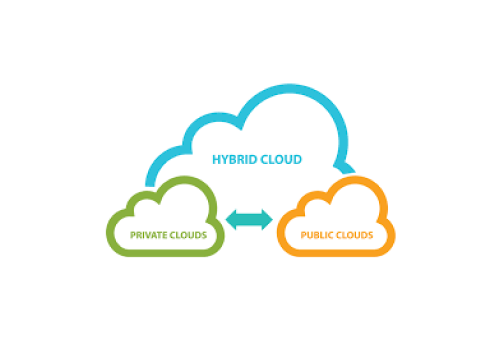
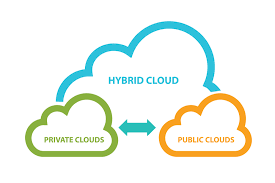
Best Practices for Managing a Hybrid Cloud Environment

Perform a Data Center Assessment

  • Inventory and Classification: Begin by conducting a detailed inventory of existing workloads, understanding their dependencies, and classifying them based on their business criticality.
  • Rationalization: Identify which workloads are suitable for migration to the cloud and which should remain on-premises. Consider factors like data sensitivity, compliance, and performance needs.

Establish Cloud Governance

  • Governance Framework: Set up a governance framework for managing workloads across private and public cloud environments. This framework should address operations, regulatory compliance, security, and the management of mission-critical applications.
  • Compliance & Regulatory Guidelines: Ensure that policies around data handling, privacy, and regulatory requirements are met, especially when migrating workloads to the cloud.

Create Stringent Guidelines and Policies

  • Documented Policies: Develop clear guidelines for how applications and data should be migrated to either private or public clouds. This includes performance expectations, compliance needs, geographic restrictions, and business-critical application requirements.

Reassess Resources and Capabilities

  • Resource Optimization: Hybrid cloud solutions provide new capabilities, so take this opportunity to assess how additional resources can address business needs without disrupting current operations. Look for efficiencies in both IT and business processes.

Monetization Opportunities

  • Cost Efficiency: The hybrid cloud can lead to significant cost savings. Transition from a traditional CAPEX model (Capital Expenditure) to an OPEX (Operational Expenditure) model by leveraging on-demand cloud capacity, reducing the need for hardware investments.
  • Evaluate Future Expenditures: As part of your hybrid strategy, analyze future capital expenditures and assess if cloud solutions can reduce or eliminate these costs.

Manpower Management

  • Skill Requirements: A hybrid cloud environment demands specialized expertise. Consider whether to train existing staff or engage with third-party service providers who have experience in managing complex cloud infrastructures.
  • Resource Planning: Ensure your team is equipped with the skills necessary to implement, manage, and maintain a hybrid cloud infrastructure, covering areas like compliance, storage, networking, and virtualization.

Implement Hybrid Cloud in Phases

  • Gradual Migration: Avoid rushing the transition to hybrid cloud. Start with migrating a few less-critical applications or workloads and scale up as you gain confidence in the system’s performance and security. This iterative approach helps build trust among stakeholders, including management and users.
  • Continuous Improvement: The flexible nature of hybrid cloud allows for ongoing refinement. Monitor performance and make adjustments as needed.

Conclusion

Designing and implementing a hybrid cloud strategy requires thoughtful planning, clear governance, resource optimization, and phased execution. By following these best practices, organizations can effectively combine the security and customization of private cloud with the scalability and flexibility of public cloud, ultimately driving both innovation and cost efficiency.

For more detailed guidance on how a hybrid cloud solution can benefit your business, contact an SNP representative.

Accelerate App Innovation with SNP’s Azure Kubernetes Services

Businesses know that shifting to the cloud can reduce costs, boost performance, and enable them to scale based on rising (or falling) traffic. However, reports show that in 2019, just 22% of enterprise primary workload deployments were on the public cloud. The top issue: complex legacy apps that are resistant to modernization.

Common issues facing IT teams today include:

  • Scalability: Existing DevOps infrastructure cannot scale to accommodate growth.
  • Infrastructure: VM software requires significant space, limiting potential ROI.
  • Potential for Modernization: Internal resources are not equipped to optimize a cloud solution.
  • Technical Debt: Technical debt drives incompatibility with cloud solutions.
  • Speed: Latency and time to deployment for new apps needs to be reduced.
  • Security: Need to improve control over security of app data.

Modern approaches to software development deliver value faster by breaking large applications into smaller containers. These containers make it easier for your team to split a large legacy app into smaller modules that can be built, tested, and deployed.

SNP’s Azure Kubernetes Services (AKS) is a fully managed Kubernetes solution that lets you:

  • Simplify Operations:  AKS simplifies operations and gives you access to improved security, lower costs, and the innovative potential of the cloud.
  • Innovation: Create new revenue opportunities; provide business partners and customers secure access to corporate resources; leverage data analytics and AI to advance business insights.
  • Security, Identity and Governance: Leverage Microsoft’s enterprise security by enabling user identity framework and governance solutions.
  • Business Continuity &  Disaster Recovery: Leverage Azure’s dynamic disaster recovery capabilities.
  • Increase speed-to-market: Accelerate efficiency in an agile application development cycle; enable improved management and scalability; enable rapid development of new business tools and applications.
  • Flexibility: Implement co-existence of on-premises and cloud solutions; provide support for customer’s open source development initiatives.

Why SNP?

We Deliver Expertise: SNP helps customers drive  organizational maturity through improved technical agility.

Get IT Done, Faster: We help you make the right decisions  and accelerate  implementation.

Exceptional Azure Know How: Together, SNP and Azure are  leveraging the power of the cloud for digital innovation.

Contact SNP Technologies here

Big Data and the Cloud

Big Data and the cloud have a synergistic relationship that enables organizations to harness vast amounts of data efficiently and effectively. Here’s an overview of how cloud computing supports big data initiatives and the benefits of integrating the two:

Understanding Big Data

Big Data refers to the large volumes of structured, semi-structured, and unstructured data that inundate businesses daily. The characteristics of big data are often summarized by the “Three Vs”:

  • Volume: The sheer amount of data generated and stored.
  • Velocity: The speed at which data is created, processed, and analyzed.
  • Variety: The different types of data (text, images, videos, etc.) coming from various sources.

The Role of Cloud Computing in Big Data

  1. Scalability
    • Elastic Resources: Cloud platforms allow organizations to scale their resources up or down based on data processing needs, ensuring they can handle large datasets without investing in physical infrastructure.
  2. Cost Efficiency
    • Pay-as-You-Go Model: Organizations can pay only for the resources they use, reducing costs associated with maintaining on-premises hardware and software.
  3. Data Storage and Management
    • Cloud Storage Solutions: Services like Amazon S3, Google Cloud Storage, and Azure Blob Storage provide scalable storage options for storing vast amounts of data reliably and securely.
  4. Processing Power
    • Distributed Computing: Cloud providers offer powerful processing capabilities, enabling the use of frameworks like Apache Hadoop and Apache Spark for distributed data processing across multiple nodes.
  5. Data Analytics and Insights
    • Integrated Tools: Cloud platforms often come with built-in analytics tools (e.g., Azure Synapse, Google BigQuery) that allow organizations to analyze data quickly and derive insights without complex setup.
  6. Real-Time Data Processing
    • Stream Processing Services: Cloud solutions like Azure Stream Analytics and AWS Kinesis enable real-time data ingestion and processing, allowing organizations to respond to data as it flows in.
  7. Collaboration and Accessibility
    • Global Access: Cloud-based solutions facilitate collaboration by allowing teams to access and analyze data from anywhere, promoting a more agile and responsive approach to data management.
  8. Security and Compliance
    • Advanced Security Measures: Cloud providers invest heavily in security technologies and compliance frameworks, offering features like encryption, access controls, and auditing to protect sensitive data.

Use Cases of Big Data in the Cloud

  • Customer Insights: Organizations can analyze large datasets from customer interactions to understand preferences, optimize marketing strategies, and enhance customer experiences.
  • Predictive Analytics: Companies can use historical data to forecast future trends, improve inventory management, and make data-driven decisions.
  • IoT Data Management: The cloud provides the infrastructure necessary to store and process data generated from Internet of Things (IoT) devices, enabling real-time analysis and insights.
  • Social Media Analytics: Businesses can leverage big data analytics to monitor social media trends, sentiment analysis, and engagement metrics to inform marketing strategies.

Conclusion

The combination of big data and cloud computing offers organizations the flexibility, scalability, and power needed to manage and analyze vast amounts of data effectively. By leveraging cloud-based tools and services, businesses can unlock valuable insights, enhance decision-making, and drive innovation, all while minimizing costs and complexity. Embracing this synergy is essential for any organization looking to thrive in today’s data-driven landscape.

For more information,  Contact Us Here