Re-imagining Semantic Search Inside Power BI

The Hidden Cost of “Simple” Search Apps

Many organizations already leverage Azure AI Search—a powerful service that makes text and documents searchable through semantic and vector search.

But time and again, we see a familiar pattern:

  • A new web app is built (maybe in Streamlit or React).
  • It’s hosted on Azure App Service or virtual machines.
  • Authentication, hosting, monitoring, and DevOps pipelines are duplicated.
  • And in the end, users get a search box and a results table.

The outcome delivers business value, yes—but at a high operational cost and unnecessary complexity.
A Simpler, Smarter Alternative

Now imagine a different approach.

What if your users could:

  • Type a search query,
  • Get semantic results with highlights and summaries, and
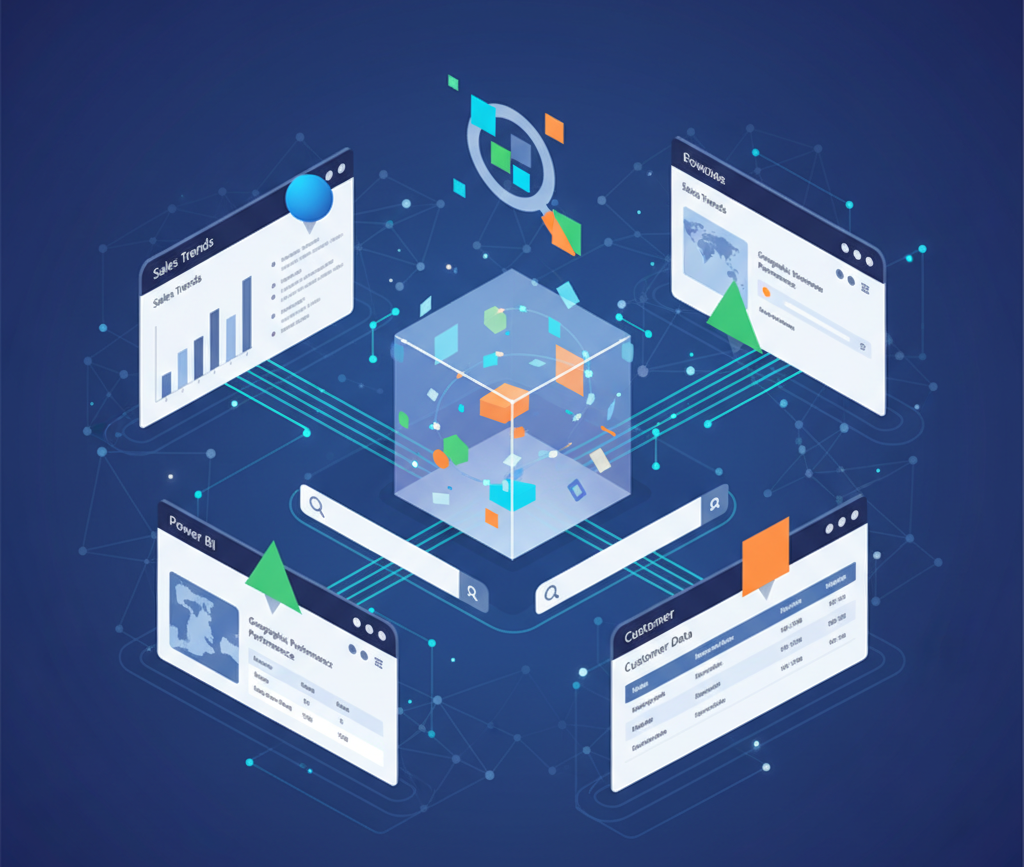
  • See them directly inside the Power BI dashboards they already use every day?

No new app.
No separate portal.
No extra infrastructure to maintain.

Just a familiar search box embedded in Power BI, powered by Azure AI Search and AI summarization—running entirely inside Power BI, with no Power Apps or Power Automate required.

What the Solution Includes

This integrated Power BI solution offers:

  • Free-text input for users to type search queries.
  • Native Power BI filters (date, region, product, etc.) alongside semantic search results.
  • Paging support for navigating large result sets.
  • Export options to Excel, CSV, PDF, and more.
  • Multiple report pages to query across different indexes, documents, or datasets.
  • Native Power BI authentication for secure, seamless access.

In short, it combines semantic intelligence with Power BI’s interactivity and security—all within a single analytics experience.

High-Impact Use Cases

Organizations can unlock immediate value with this approach in areas such as:

  • Customer Service: Analyze complaint text for recurring issues like refunds, delays, or product defects.
  • Compliance & Legal: Instantly surface contract clauses or policy excerpts in dashboards.
  • Operations & IT: Search across incident logs and root cause analyses.
  • HR & Internal Communications: Make employee policies and FAQs instantly discoverable.

All this—without building or maintaining another app that IT must support.

Why It Matters

This design delivers impact where it counts most:

  • 💰 Cost Savings: Eliminate redundant web app hosting, authentication, and DevOps overhead.
  • 🙌 User Adoption: Users already know Power BI—no new tools or training required.
  • Speed: What once took weeks of development can now be delivered in days.

By keeping it simple, this approach dramatically reduces time-to-value and improves accessibility.

Where This Approach Works Best

This solution is intentionally streamlined and optimized for clarity, speed, and integration. It excels when you need:

  • A single query to retrieve relevant, contextual results.
  • Concise summaries and highlights displayed directly in Power BI.
  • Seamless blending of search results with existing metrics and dashboards.

It’s built for search + analytics, not conversational AI.

If your use case requires:

  • Multi-turn or follow-up Q&A,
  • Chat-style context retention, or
  • Dynamic document uploads and reasoning,
    then a different, more interactive architecture would be a better fit.

Think of this solution as:

One search → One set of insights → Instantly displayed in Power BI

Fast. Clean. Insightful.

Your Next Step Toward Smarter Search

What’s exciting about this solution isn’t that it’s cutting-edge—it’s that it’s surprisingly simple. And in that simplicity lies its biggest advantage: faster delivery, lower cost, and easier adoption.

If you’re managing multiple priorities, this is the ideal lightweight, high-impact approach for proving value quickly. You don’t need a full-blown application—just a Power BI report and your existing Azure AI Search index.

You can have it running on your own data in days, not weeks.

Bring us your use case, and we’ll help you stand it up fast—through a proof of concept or full implementation.
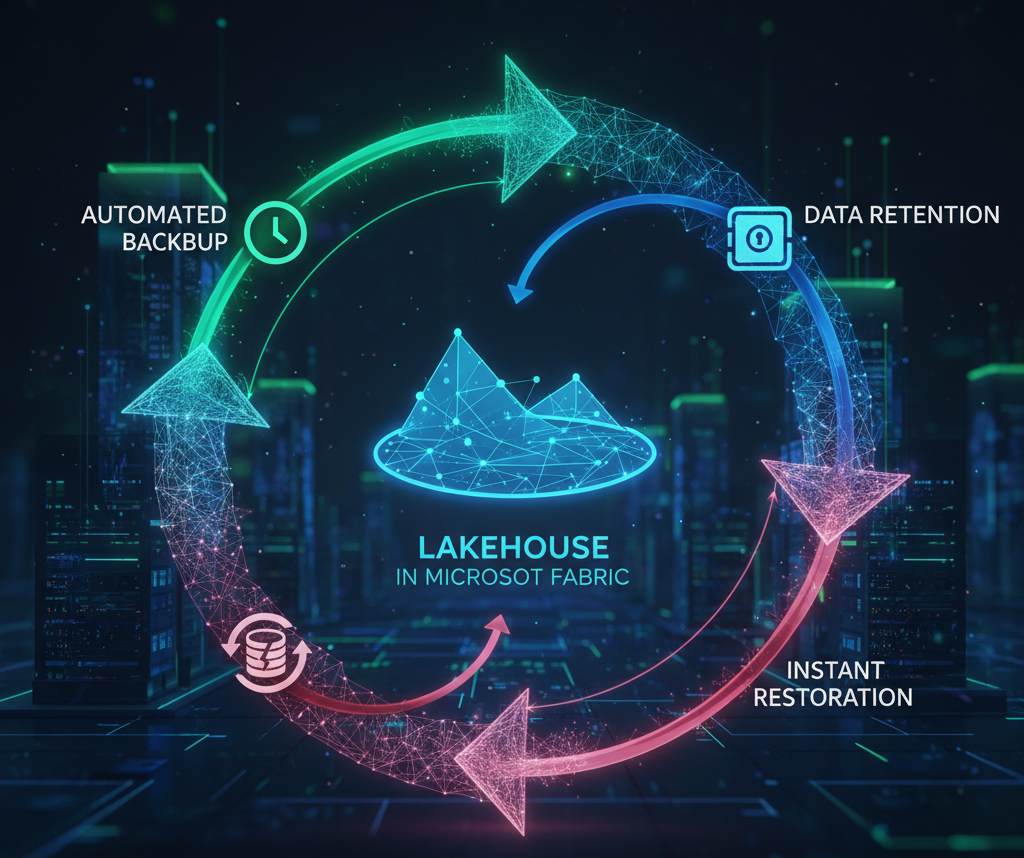
Automating Backup, Retention, And Restoration For Lakehouse In Microsoft Fabric

Data resilience is the foundation of every modern analytics platform. In Microsoft Fabric, implementing automated backup, retention, and restoration strategies is essential to strengthen data protection and ensure operational continuity.

While Microsoft Fabric includes built-in disaster recovery (DR) capabilities, these are not intended to address everyday operational issues such as data refresh failures, accidental deletions, or data corruption. To bridge these gaps, an automated backup and retention approach becomes critical—helping organizations maintain seamless operations and data reliability.

Note: The methods described here are not replacements for Microsoft Fabric’s disaster recovery features. Instead, they serve as a complementary layer to enhance resilience, streamline restoration, and minimize downtime through automation and proactive configurations.

Setting Up Backup and Retention Policies

Microsoft Fabric’s Lakehouse and OneLake architectures provide robust foundations for data management. However, to ensure durability and compliance, automated backup and retention policies must be thoughtfully designed.

Key Components:

  • Daily Incremental Backups: Capture daily snapshots to minimize data loss and maintain version history.
  • Retention Policy Configuration: Define retention tiers—daily, weekly, monthly, and yearly—to balance compliance requirements and storage efficiency.
  • Automation via Notebooks: Utilize Fabric notebooks or scheduled Spark jobs to automate backup creation, enforce retention policies, and clean up obsolete data.

Automation Highlights:

  1. Backup Creation: Scheduled scripts trigger snapshot creation at defined intervals. For instance, Spark jobs leveraging APIs such as mssparkutils can efficiently copy and version datasets.
  2. Retention Enforcement: Policy-based automation ensures outdated backups are automatically purged while preserving those required for compliance or audits.
  3. Logging and Monitoring: Every backup, cleanup, and restoration task is logged for transparency, traceability, and audit-readiness.

Restoration: Recovering from Data Loss

Restoring data in Fabric can be performed at multiple levels—either the entire Lakehouse or specific tables—depending on the recovery need.

Restoration Best Practices:

  • Restore data directly from automated snapshots or archived backups.
  • Leverage structured logs to diagnose and resolve issues encountered during restoration.
  • Minimize downtime by using predefined scripts or automation workflows that accelerate recovery and reduce manual intervention.

Why Automate Backup and Retention in Microsoft Fabric?

Automation introduces consistency, reliability, and efficiency—key pillars of a resilient data ecosystem.

Core Benefits:

  • Data Integrity: Automated, incremental backups safeguard critical datasets against accidental loss or corruption.
  • Operational Continuity: Rapid, scripted restorations minimize business disruption.
  • Cost Optimization: Automated cleanup routines remove redundant backups, optimizing storage utilization.
  • Scalability: Policy-driven automation scales effortlessly with expanding data volumes and evolving business needs.

Conclusion

Microsoft Fabric empowers organizations with a unified, intelligent data platform—but ensuring data durability and operational continuity requires more than built-in DR. By automating backup, retention, cleanup, and restoration processes, organizations can strengthen data resilience, minimize downtime, and maximize the business value of their Fabric investments.

In essence, automation transforms data protection from a reactive process into a proactive, scalable strategy—one that keeps pace with modern analytics demands and ensures the integrity of your most valuable asset: data.

RAG in the Real World: Why Scalable AI Needs More Than Just Retrieval and Prompts

Executive Summary

Retrieval-Augmented Generation (RAG) has quickly become one of the most glorified terms in enterprise AI. RAG is typically showcased over a handful of PDFs which seems to be easy and simple. But operating at enterprise scale—lakhs (hundreds of thousands) of records, low-latency retrieval, strict accuracy, and predictable costs—is hard. Real limits show up in four places: embeddings, vector indexes (e.g., Azure AI Search), retrieval/filters, and LLMs themselves. You’ll need hybrid architectures, careful schema/ops, observability, and strict cost controls to get beyond prototypes.

Embedding Challenges at Scale

Cost & volume. Embedding large datasets quickly runs into scale issues. Even a moderately sized corpus—each record carrying a few hundred to thousands of tokens—translates into tens of millions of tokens overall. The embedding phase alone can run into significant dollar costs per cycle, and this expense only grows as data is refreshed or re-processed.

Throughput & reliability. APIs enforce token and RPM limits. Production pipelines need:

  • Token-aware dynamic batching
  • Retry with backoff + resume checkpoints
  • Audit logs for failed batches

Chunking trade-offs.

  • Too fine → semantic context is lost
  • Too coarse → token bloat + noisy matches Use header/paragraph-aware chunking with small overlaps; expect to tune per source type.

Domain relevance gaps. General-purpose embeddings miss subtle, domain-specific meaning (biomedical, legal, financial). Dimensionality isn’t the cure; domain representation is. Without specialization, recall will feel “lexical” rather than truly semantic.

Vector Databases: Strengths… and Constraints for RAG

Immutable schema. Once an index is created, fields can’t be changed. Adding a new filterable/tag field → recreate the index.

Full reloads. Schema tweaks or chunking updates often require re-embedding and re-indexing everything—expensive and time-consuming (parallelism will still hit API quotas).

Operational sprawl. Multiple teams/use cases → multiple indexes → fragmented pipelines and higher latency. Unlike a DB with views/joins, AI Search pushes you toward rigid, static definitions.

(Reference: Microsoft docs on Azure AI Search vector search and integrated vectorization.)

Retrieval & Filtering Limits

Shallow top-K. Even at top-K, relevant items can fall just outside the cut-off. In regulated domains, a single miss matters.

Context window pressure. As best practice we should send only required fields, then join externally on predicted Answers which will have key identifiers Like ID to finish the answer. (In our Scenario we sent 1-2 columns having Id, descriptions out of 25 columns in a table)

Filter logic ceiling. Basic metadata filters work, but you’ll miss nested conditions, dynamic role-based filters, and cross-field joins that are trivial in SQL.

LLM Limitations You Will Hit

Input limits. Even with large-context models (450k+ tokens),However, even within this boundary, we observed that certain records — particularly those in lower relevance ranges may be implicitly skipped during reasoning .This behaviour is non-deterministicand poses serious challenges for enterprise-grade tasks where every data point is critical

Output limits.Many models cap useful output (e.g., 2k–16k tokens). This affects multi-record responses, structured summaries, and complex decision-making outputs — leading to truncated or incomplete responses, particularly when returning JSON, tables, or lists.

Latency & variance. Complex prompts over hundreds of records can take minutes. Stochastic ranking creates run-to-run differences—tough for enterprise SLAs.

Concurrency & quotas. Enterprises face quota exhaustion due to shared token pools, Concurrent usage by multiple users or batch agents can quickly consume limits Smaller organizations with access to 8K input / 2K outputtoken models (e.g., LLaMA, Mistral) face even tighter ceilings — making RAG challenging beyond pilot projects

Productionisation, Observability — and Evaluation That Actually Matters

While most RAG demos end at a “right-looking” answer, real deployments must be observable, traceable, resilient, and continuously evaluated. GenAI pipelines often underinvest in these layers, especially with multiple async retrievals and LLM hops.

Operational pain points

  • Sparse/unstructured LLM logs → hard to reproduce issues or inspect reasoning paths.
  • Thin vector/AI Search telemetry → silent filter failures or low-recall cases go unnoticed.
  • Latency tracing across hybrids (SQL + vector + LLM) is messy without end-to-end spans.
  • Failure isolation is non-trivial: embed vs ranker vs LLM vs truncation?

What good observability looks like

  • End-to-end tracing (embed → index → retrieve → rerank → prompt → output).
  • Structured logs for: retrieval sets & scores, prompt/response token usage, cost, latency, confidence, and final joins.
  • Quality gates and alerts on recall@K, latency budgets, cost per query, and hallucination/citation signals.

Evaluation: beyond generic metrics

  • Partner with domain experts to define what “good” means. Automatic scores alone aren’t enough in regulated or domain-heavy settings.
  • Build a domain ground-truth set (gold + “acceptable variants”) curated by SMEs; refresh it quarterly.
  • Establish a human-in-the-loop loop: double-blind SME review on sampled traffic; escalate low-confidence or low-evidence answers by policy.
  • Maintain an error taxonomy (missed retrieval, wrong join, truncation, unsupported query, hallucination) with severity labels; track trends over time.
  • Run canaries/A-B tests in prod; compare quality, latency, cost, and SME acceptance before full rollout.
  • Log evaluation metadata (query id, versioned index, chunking config, model/runtime version) so you can pinpoint regressions.

In practice (our pattern)

  • We co-defined a gold set with SMEs and require evidence-backed answers; low-evidence responses are auto-routed to review.
  • We track recall@K + citation coverage for retrieval, and field-level precision/recall for extraction tasks, alongside cost/latency dashboards.

Bottom line Without observability + domain-grounded evaluation, production RAG stays brittle and opaque. With them, you get a system you can debug, trust, and scale—not just a demo that looks good once.

Conclusion: Beyond the Buzzwords

While Retrieval-Augmented Generation (RAG) has gained mainstream attention as the future of enterprise AI, real-world adoption reveals a wide gap between expectation and execution. From embedding inconsistencies and rigid vector schema constraints to LLM context bottlenecks and high operational latency, the challenges compound rapidly at production scale. Even in enterprise environments with access to high-token models, limitations around completeness, determinism, and runtime stability remain unresolved.

This doesn’t mean RAG is fundamentally flawed—it’s a powerful paradigm when paired with the right retrieval tuning, agent orchestration, hybrid pipelines, and system-level observability. But as engineers and architects, it’s time we shift the conversation from aspirational posts to grounded, production-aware designs. Until embedding models evolve to be truly domain-specific, vector systems allow dynamic schemas, and LLMs deliver predictable performance at scale, RAG should be treated not as a plug-and-play solution—but as a custom-engineered pipeline with domain, data, and budget constraints at its core

This blog represents the collective strength of our AI team—where collaboration, innovation, and expertise come together to create meaningful insights. It is a testament to the value SNP delivers through its AI practice, showcasing how we help our customers turn possibilities into impact.

SNP’s Managed Detect & Response Services Powered by Microsoft Sentinel & Defenders (MXDR)

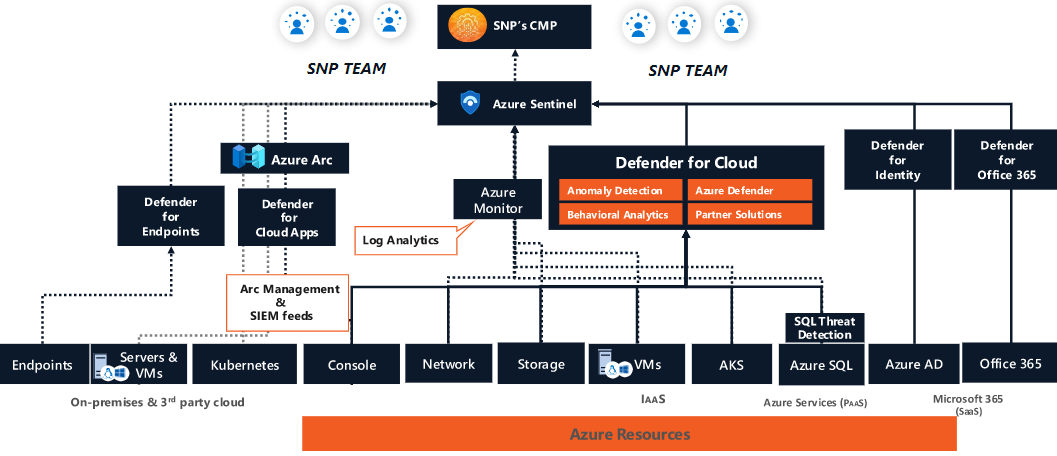
SNP’s Managed Detection and Response (MDR) for Microsoft Sentinel service, brings integrations with Microsoft services like Microsoft Defenders (MXDR), threat intelligence and customer’s hybrid and multi-cloud infrastructure to monitor, detect and respond to threats quickly. With our managed security operations team, SNP’s threat detection experts help identify, investigate and provide high fidelity detection through ML-based threat modelling for your hybrid and multicloud infrastructure.

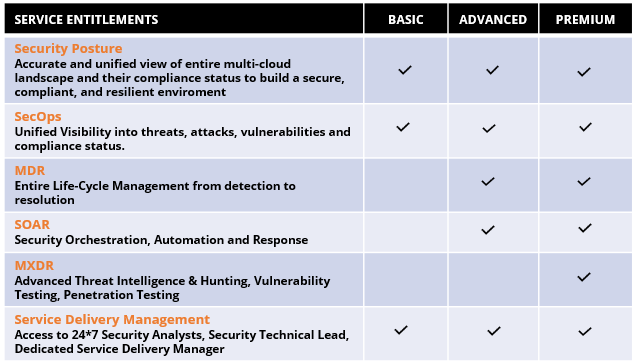
SNP’s MXDR Services Entitlements:

SNP’s Managed services security framework brings the capability of centralized security assessment for managing your on-premises or cloud infrastructure, where we offer:


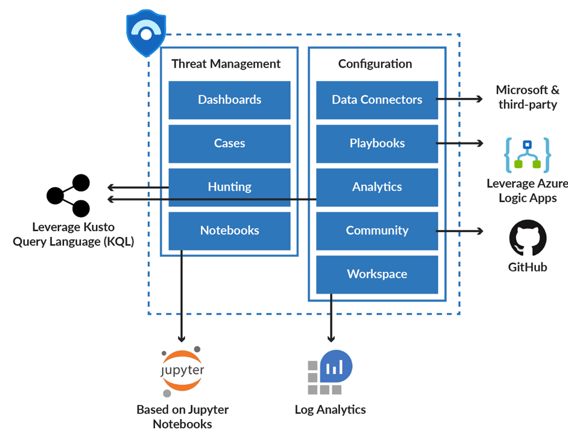
Leveraging SNP’s security model below, we help our customers:

  • Build their infrastructure and applications with cloud-native protection throughout their cloud application lifecycle.
  • With defined workflows, customers get the ease of separating duties in entitlements management to protect against governance and compliance challenges.
  • Data security is prioritized to protect sensitive data from different data sources to the point of consumption.
  • With Azure Sentinel, we consolidate and automate telemetry across attack surfaces while orchestrating workflows and processes to speed up response and recovery.


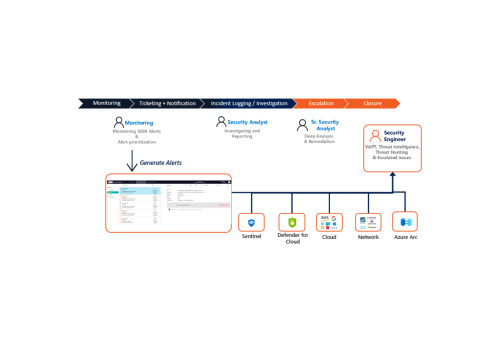
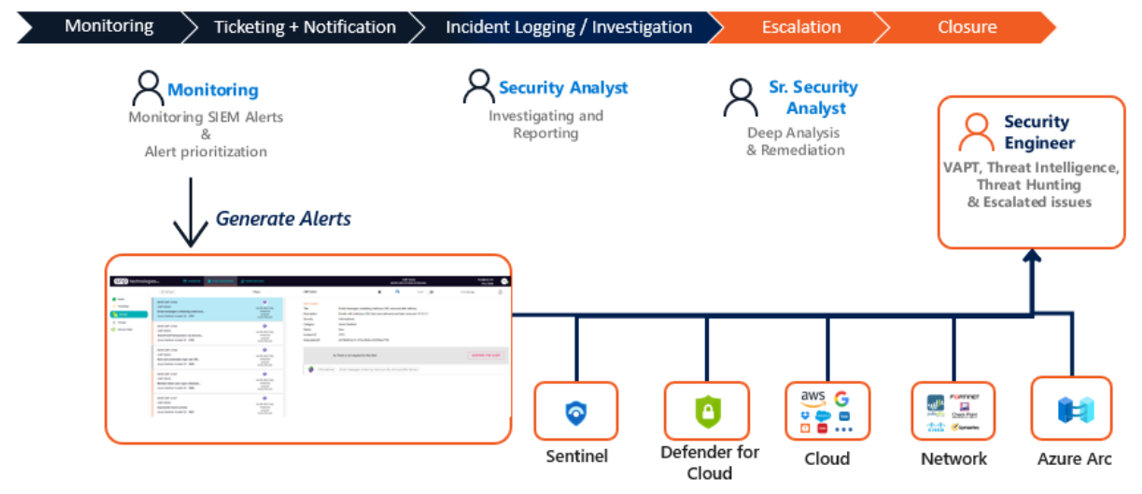
SNP’s Managed Extended Detection & Response (MXDR) Approach:

Our 6-step incident response approach helps our customers maintain, detect, respond, notify, investigate, and remediate cyberthreats as shown below:


For more on SNP’s Managed Detect & Response Services Powered by Microsoft Sentinel & Defenders (MXDR), contact our security experts here.

Bring your Data Securely to the Cloud by Implementing Column Level security, Row Level Security & Dynamic Data Masking with Azure Synapse Analytics

Azure Synapse Analytics from Microsoft is a limitless analytics service that brings together data integration, enterprise data warehousing, and big data analytics. SNP helps its customers migrate their legacy data warehouse solutions to Azure Synapse Analytics to gain the benefits of an end-to-end analytics platform that provides high availability, security, speed, scalability, cost savings, and industry-leading performance for enterprise data warehousing workloads.

A common business scenarios we cover:

As organizations scale, data grows exponentially. And with the workforce working remotely, data protection is one of the primary concerns of organizations around the world today. There are several high-level security best practices that every enterprise should adopt, to protect their data from unauthorized access. Here are our recommendations to help you prevent unauthorized data access.

The SNP solution:

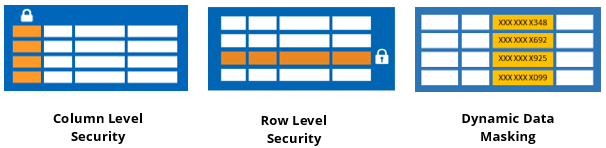
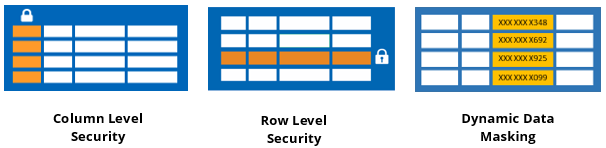
With Azure Synapse Analytics, SNP provides its customers enhanced security with column level security, row-level security & dynamic data masking.

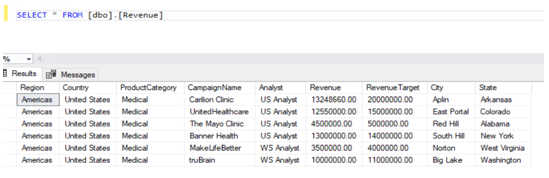
Azure Synapse SecurityBelow is an example of a sample table data which is required to implement the column level security, row-level security & dynamic data masking for your data.

Revenue table:

Azure Synapse Security

Codes:

Step:1 Create users

create user [CEO] without login;

create user [US Analyst] without login;

create user [WS Analyst] without login;


Column Level Security

A column-level security feature in Azure Synapse simplifies the design and coding of security in applications. It ensures column-level security by restricting column access to protect sensitive data.

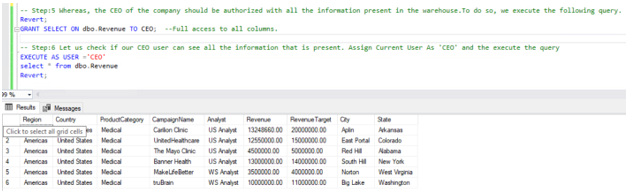
In this scenario, we will be working with two users. The first one is the CEO, who needs access to all company data. The second one is an Analyst based in the United States, who does not have access to the confidential Revenue column in the Revenue table.

Follow this lab, one step at a time to see how Column-level security removes access to the revenue column to US Analyst.


Step:2 Verify the existence of the “CEO” and “US Analyst” users in the Data Warehouse.

SELECT Name as [User1] FROM sys.sysusers WHERE name = N’CEO’;

SELECT Name as [User2] FROM sys.sysusers WHERE name = N’US Analyst’;


Step:3 Now let us enforce column-level security for the US Analyst.

The revenue table in the warehouse has information like Analyst, CampaignName, Region, State, City, RevenueTarget, and Revenue. The Revenue generated from every campaign is classified and should be hidden from US Analysts.

REVOKE SELECT ON dbo.Revenue FROM [US Analyst];

GRANT SELECT ON dbo.Revenue([Analyst], [CampaignName], [Region], [State], [City], [RevenueTarget]) TO [US Analyst];

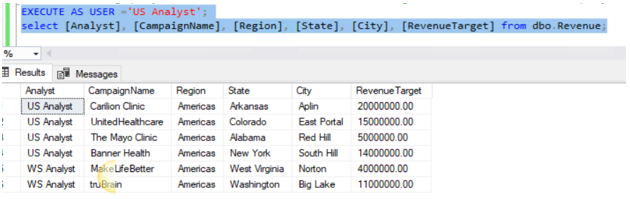
Azure Synapse SecurityThe security feature has been enforced,  where the following query with the current user as ‘US Analyst’, this will result in an error. Since the US Analyst does not have access to the Revenue column the following query will succeed since we are not including the Revenue column in the query.

Azure Synapse SecurityAzure Synapse Security

Row Level Security

Row-level Security (RLS) in Azure Synapse enables us to use group membership to control access to rows in a table. Azure Synapse applies the access restriction every time data access is attempted from any user.

In this scenario, the revenue table has two Analysts, US Analysts & WS Analysts. Each analyst has jurisdiction across a specific Region. US Analyst on the South East Region. An Analyst only sees the data for their own data from their own region. In the Revenue table, there is an Analyst column that we can use to filter data to a specific Analyst value.

SELECT DISTINCT Analyst, Region FROM dbo.Revenue order by Analyst ;

Review any existing security predicates in the database

SELECT * FROM sys.security_predicates


Step:1

Create a new Schema to hold the security predicate, then define the predicate function. It returns 1 (or True) when a row should be returned in the parent query.

CREATE SCHEMA Security

GO

CREATE FUNCTION Security.fn_securitypredicate(@Analyst AS sysname)

RETURNS TABLE

WITH SCHEMABINDING

AS

RETURN SELECT 1 AS fn_securitypredicate_result

WHERE @Analyst = USER_NAME() OR USER_NAME() = ‘CEO’

GO

Step:2

Now we define a security policy that adds the filter predicate to the Sale table. This will filter rows based on their login name.

CREATE SECURITY POLICY SalesFilter 

ADD FILTER PREDICATE Security.fn_securitypredicate(Analyst)

ON dbo.Revenue

WITH (STATE = ON);

Allow SELECT permissions to the Sale Table.

GRANT SELECT ON dbo.Revenue TO CEO, [US Analyst], [WS Analyst];


Step:3

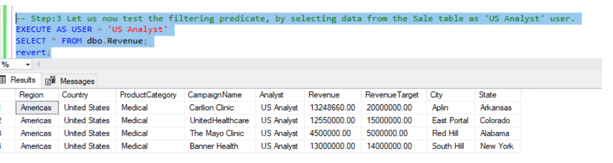
Let us now test the filtering predicate, by selecting data from the Sale table as ‘US Analyst’ user.

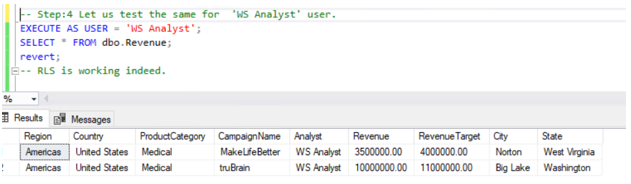
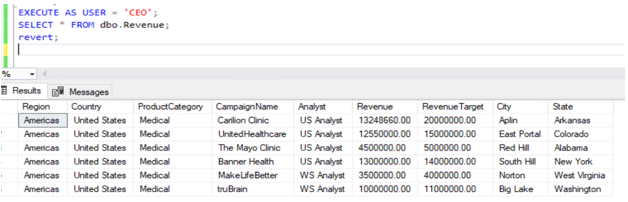
Azure Synapse SecurityAs we can see, the query has returned rows here. Login name is US Analyst and Row-level Security is working.

Azure Synapse Security

Azure Synapse Security

Dynamic Data Masking

Dynamic data masking helps prevent unauthorized access to sensitive data by enabling customers to designate how much of the sensitive data to reveal with minimal impact on the application layer. DDM can be configured on designated database fields to hide sensitive data in the result sets of queries. With DDM the data in the database is not changed. Dynamic data masking is easy to use with existing applications since masking rules are applied in the query results. Many applications can mask sensitive data without modifying existing queries.

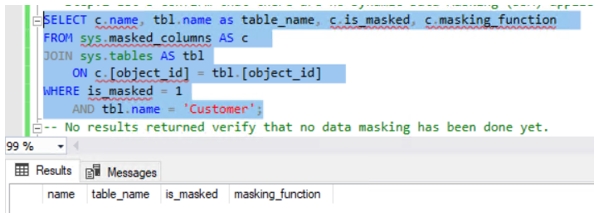
In this scenario, we have identified some sensitive information in the customer table. The customer would like us to obfuscate the Credit Card and Email columns of the Customer table to Data Analysts.

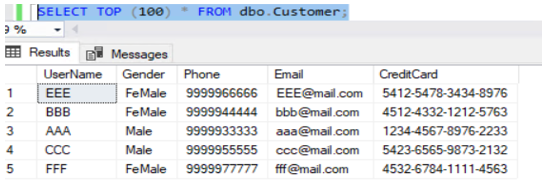
Let us take the below customer table:

Azure Synapse SecurityConfirmed no masking enabled as of now,

Azure Synapse Security

Let us make masking for Credit card & email information,

Step:1

Now let us mask the ‘CreditCard’ and ‘Email’ Column of the ‘Customer’ table.

ALTER TABLE dbo.Customer 

ALTER COLUMN [CreditCard] ADD MASKED WITH (FUNCTION = ‘partial(0,”XXXX-XXXX-XXXX-“,4)’);

GO

ALTER TABLE dbo.Customer

ALTER COLUMN Email ADD MASKED WITH (FUNCTION = ’email()’);

GO


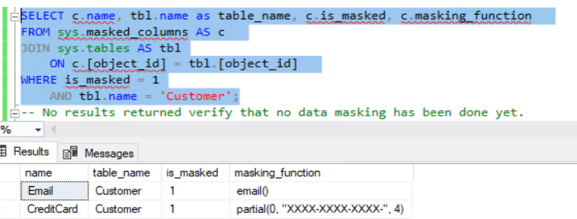
Now, the results show masking enabled for data:

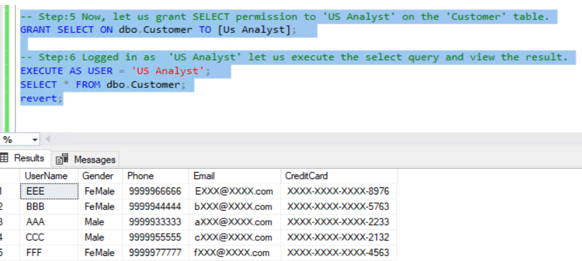
Azure Synapse SecurityExecute query as User ‘US Analyst’, now the data of both columns is masked,

Azure Synapse SecurityUnmask data:

Azure Synapse Security

Conclusion:

From the above samples, SNP has shown how column level security, row level security & dynamic data masking can be implemented in different business scenarios. Contact SNP Technologies for more information.

Top 5 FAQs on Operationalizing ML Workflow using Azure Machine Learning

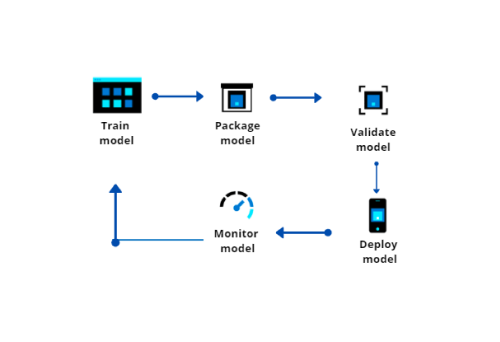
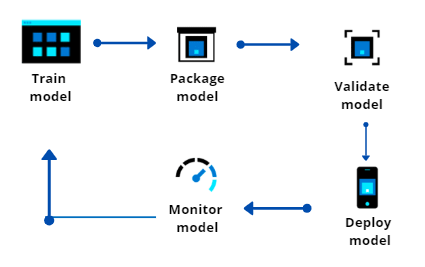
Enterprises today are adopting artificial intelligence (AI) at a rapid pace to stay ahead of their competition, deliver innovation, improve customer experiences, and grow revenue. However, the challenges with such integrations is that the development, deployment and monitoring of these models differ from the traditional software development lifecycle that many enterprises are already accustomed to.

Leveraging AI and machine learning applications, SNP helps bridge the gap between the existing state and the ideal state of how things should function in a machine learning lifecycle to achieve scalability, operational efficiency, and governance.

SNP has put together a list of the top 5 challenges enterprises face in the machine learning lifecycle and how SNP leverages Azure Machine Learning to help your business overcome them.

Q1. How much investment is needed on hardware for data scientists to run complex deep learning algorithms?

By leveraging Azure Machine Learning workspace, data scientists can use the same hardware virtually at a fraction of the price. The best part about these virtual compute resources is that businesses are billed based on the amount of resources consumed during active hours thereby reducing the chances of unnecessary billing.

Q2: How can data scientists manage redundancy when it comes to training segments and rewriting existing or new training scripts that involves collaboration of multiple data scientists?  

With Azure data pipelines, data scientists can create their model training pipeline consisting of multiple loosely coupled segments which are reusable in other training pipelines. Data pipelines also allows multiple data scientists to collaborate on different segments of the training pipeline simultaneously, and later combine their segments to form a consolidated pipeline.

Q3. A successful machine learning life cycle involves a data scientist finding the best performing model by using multiple iterative processes. Each process involves manual versioning which results to inaccuracies during deployments and auditing. So how best can data scientists manage version controlling?

Azure Machine Learning workspace for model development can prove to be a very useful tool in such cases. It tracks performance metrics and functional metrics of each run to provide the user with a visual interface on model performance during training. It can also be leveraged to register models developed on Azure Machine Learning workspace or models developed on your local machines for versioning. Versioning done using Azure Machine Learning workspace makes the deployment process simpler and faster.

Q4. One of the biggest challenges while integrating the machine learning model with an existing application is the tedious deployment process which involves extensive manual effort. So how can data scientists simplify the packaging and model deployment process?

Using Azure Machine Learning, data scientists and app developers can easily deploy Machine Learning models almost anywhere. Machine Learning models can be deployed as a standalone endpoint or embedded into an existing app or service or to Azure IoT Edge devices.

Q5. How can data scientists automate the machine learning process?

A data scientist’s job is not complete once the Machine Learning model is integrated into the app or service and deployed successfully. It has to be closely monitored in a production environment to check its performance and must be re-trained and re-deployed once there is sufficient quantity of new training data or when there are data discrepancies (when actual data is very different from the data on which your model is trained on and is affecting your model performance).

Azure Machine Learning can be used to trigger a re-deployment when your Git repository has a new code check-in. Azure Machine Learning can also be used to create a re-training pipeline to take new training data as input to make an updated model. Additionally, Azure Machine Learning provides alerts and log analytics to monitor and govern the containers used for deployment with a drag-drop graphical user interface to simplify the model development phase.

Start building today!

SNP is excited to bring you machine learning and AI capabilities to help you accelerate your machine learning lifecycle, from new productivity experiences that make machine learning accessible to all skill levels, to robust MLOps and enterprise-grade security, built on an open and trusted platform helping you drive business transformation with AI. Contact SNP here.

Azure’s Software Defined Connectivity — Virtual WAN

The hybrid cloud network consists of both physical and virtualized technologies to provide connectivity across Cloud, private data centers, on-premises, and branch offices. To help customers with their massive modernization efforts, SNP leverages the Azure Virtual WAN to build and deploy applications while simplifying branch connectivity. 

Azure Virtual WAN:

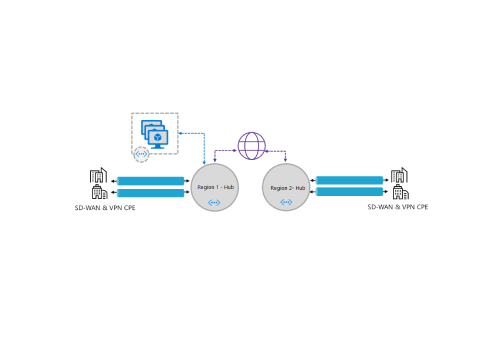
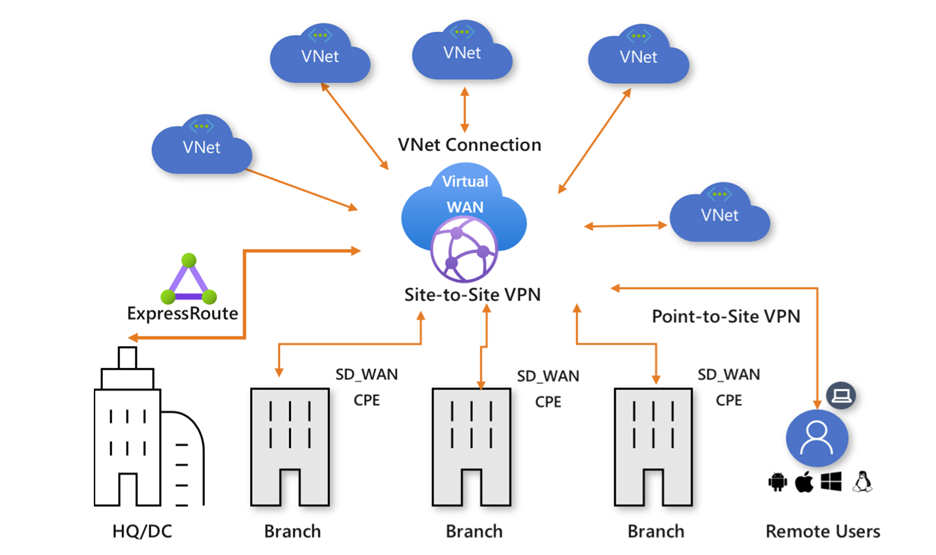
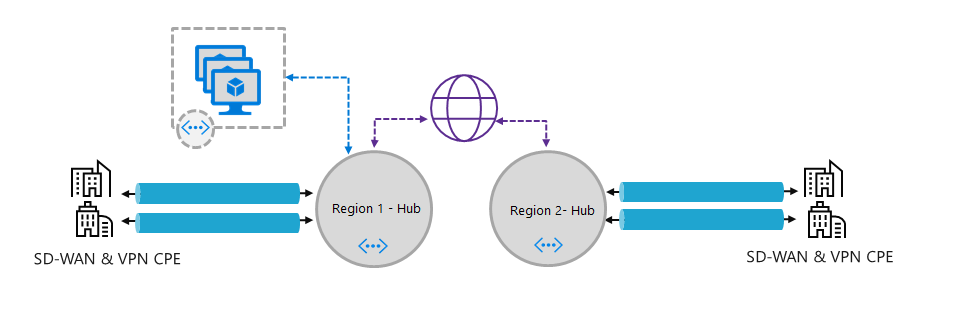
Azure’s Virtual WAN is software-defined connectivity that allows you to take advantage of optimized and automated branch connectivity on a global scale with Azure. Virtual WAN provides a better networking experience by seamlessly connecting branches to Azure with SDWAN & VPN devices (i.e., Customer Premises Equipment or CPE) with built-in ease of use and configuration management. It also provides security and routing functionalities to provide a single operational interface.

  • Branch connectivity (via connectivity automation from Virtual WAN Partner devices such as SD-WAN or VPN CPE).
  • Site-to-site VPN connectivity.
  • Remote user VPN connectivity (point-to-site).
  • Private connectivity (ExpressRoute).
  • Intra-cloud connectivity (transitive connectivity for virtual networks).
  • VPN ExpressRoute inter-connectivity.
  • Routing, Azure Firewall, and encryption for private connectivity.


How it works:

Traffic from branches goes into Microsoft’s network at the Microsoft edge site which is closest to a given branch office. Currently, there are 130 of these sites in the Microsoft global network. Once traffic is within the network, it can terminate one of your Virtual WAN’s virtual hubs. 


Azure’s Virtual WAN offers benefits like:

  • Integrated connectivity solutions in hub and spoke: Automate site-to-site configuration and connectivity between on-premises branch office and an Azure hub.
  • Automated spoke setup and configuration: Connect virtual networks and workloads to the Azure hub seamlessly.
  • Intuitive troubleshooting: Ability to see the end-to-end flow within Azure, and then use this information to take required actions.
  • Massive scalability with software-defined connectivityConnect global branch offices, point-of-sale locations, and sites using Azure and the Microsoft global network.
  • Optimize security and agility: Leverage secure transport network services and integrated firewall capabilities to ensure the secure delivery of all applications across your hybrid enterprise. Securely identify and manage the performance of today’s modern and encrypted applications running over SSL, TLS, and HTTPS.
  • One place for managing your network: Quickly respond to the needs of your business with application-centric, business intent-based policies that are centrally managed and applied network-wide across all remote locations.
  • Reduced costs: Maximize the use of redundancy and lower-cost connectivity options with zero-touch provisioning and centralized management to reduce the cost of deploying and maintaining a hybrid WAN architecture.
  • Reliability: Create a highly available WAN architecture that virtualizes and dynamically leverages multiple links at remote locations. Retain end-to-end visibility of network performance and end-user experience for troubleshooting and problem resolution.
  • Performance: Deliver superior application performance to your business with the industry-leading WAN optimization solution from SNP.


For more information on Azure Virtual WAN, contact SNP Technologies here.

Ensure PaaS Resources Are Private in Your Hybrid Cloud

Use a secure hub-spoke network architecture and Azure Policies to enforce the use of Private Endpoints in a hub’s centralized, private DNS zone.

Security is a leading concern as enterprises adopt hybrid cloud strategies and a challenging one at that. At SNP Technologies, we have hybrid security solutions to meet the stringent security requirements of our customers.

In this article, we highlight the scenario wherein the organization has adopted Azure managed resources, such as Azure SQL Database and Azure App Service, in their hybrid cloud solution architecture. These so-called “platform-as-a-services” resources (or PaaS for short) are exposed to the public internet by default.

Hence, the challenge is how to reign in the PaaS resources, so their traffic only flows over the organization’s private network. The solution entails the integration of DNS zones with private endpoints and the use of government policies to enforce the security configuration for each PaaS resource added to the network.

First, we discuss a recommended network architecture to fulfill this requirement. Then we provide examples of governance policies designed by SNP that enforce secure practices for private IP range integration and name resolution. These methods solve many hybrid cloud solution architecture concerns, like:

  • Configuring a Hub & Spoke network model with an Azure private DNS zone
  • Handling the redirect of DNS queries originating from on-premises to an Azure private DNS zone via a private IP
  • Providing an Azure Virtual Network private IP for Azure managed (PaaS) resources (e.g., Azure SQL, App Service)
  • Connecting Azure PaaS resources to Azure private DNS zones for DNS resolution
  • Blocking public endpoints on Azure PaaS resources
  • Deploying PaaS resources on different subscriptions within the same tenant

Networking Solution

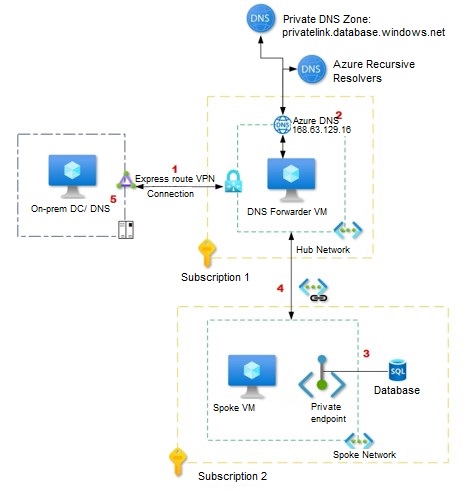
Figure 1 illustrates the architecture designed by SNP engineers to secure a hybrid cloud having PaaS resources. This example has an Azure SQL database and the architecture features:

  1. For the on-premises network, the Active Directory DNS servers are configured with conditional forwarders for each private endpoint public DNS zone, such as *.database.windows.net* and *.windows.net*. These are then pointed to the DNS server hosted in the Hub VNet in Azure.
  2. The DNS server hosted in the hub VNet on Azure uses the Azure-provided DNS resolver (168.63.129.16) as a forwarder.
  3. The virtual network used as a hub VNet is linked to the Private DNS zone for Azure services names, such as privatelink.database.windows.net.
  4. The spoke virtual network is only configured with hub VNet DNS servers and will send requests to DNS servers.
  5. When the DNS servers hosted on Azure VNet are not the authoritative Active Directory domain names, conditional forwarders for the private link domains are set up on on-premises DNS servers pointing to the azure DNS forwarders.

Figure 1


Governance Solution

A ensure private networking for PaaS resources, the following conditions should be met:

  • The PaaS resource has a private endpoint, not a public endpoint
  • A DNS record for the PaaS resource is entered in the central, private DNS zone for the entire network

Below we describe three policies that work together to ensure these conditions are met.

Please note that the policies are customized and not built-in Azure policies (e.g. Azure Policy samples). In the list of resources provided at the end of this article is a link to a tutorial on how to create a custom policy definition in Azure.

Policy 1: Disable public endpoint for PaaS services

Why: Access to endpoints are by default accessible over the public internet.

How: This policy prevents users from creating Azure PaaS services with public endpoints and invokes an error if the private endpoint is not configured at resource creation.

Note: In Azure, the resource that enables the private endpoint is Azure Private Link. Please refer to the Resources section at the end of this article for links to related Azure documentation.

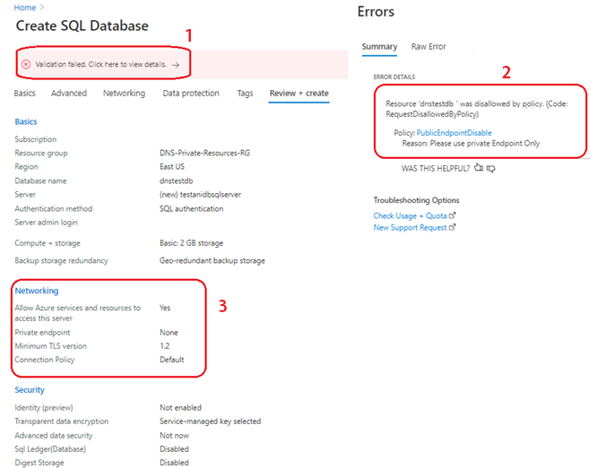
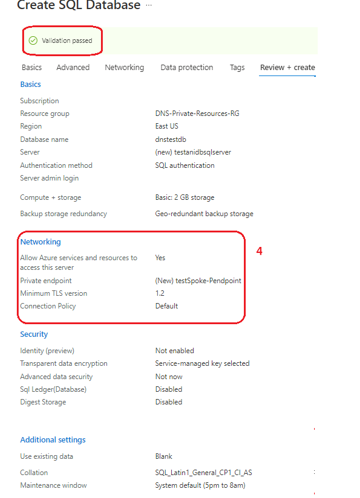
Figure 2 depicts the Azure Portal screen when the policy criteria is not met:

1. Validation fails because of the governance policy

2. Error Details indicate the Azure Policy that disallows the Public Endpoint creation

3. In the Networking section we see that “Private endpoint” setting is set to “None”

4. Once the Private endpoint is added, the policy validation passes (Figure 3)

Figure 2

Networking Solution for Ensure PaaS Resources Are Private in Your Hybrid Cloud


Figure 3

Networking Solution for Ensure PaaS Resources Are Private in Your Hybrid Cloud

Policy 2: Deny creation of a private DNS zone with a Private Link prefix

Why: By default, when you create a private endpoint, a private DNS zone is created on each spoke subscription.

As a centralized DNS with a conditional forwarder and private DNS zones is used in our architecture, we need to prevent the user from creating their own Private Link, private DNS zones for each new resource added to the network. If ungoverned, sprawl would occur.

How: This policy prevents creation of a private DNS zone with a Private Link prefix in the spoke subscriptions. With Policy 3 that follows, we associate the newly created resource with a central, private DNS zone already in the hub.

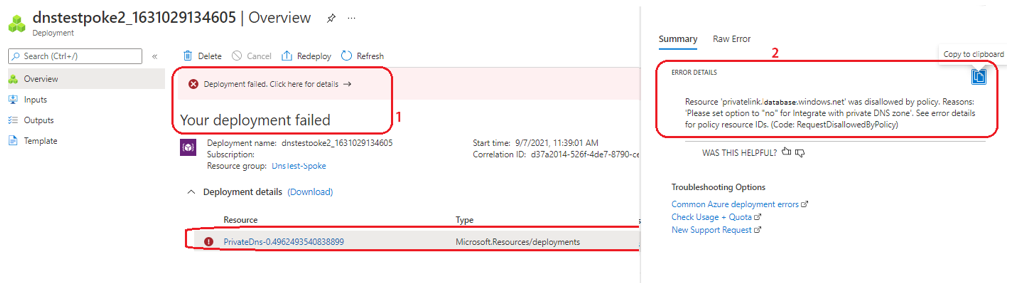
Figure 4 shows the Azure Portal screen when the policy criteria is not met, and user tries to deploy a DNS zone for a Private Link.

1. Deployment fails due to policy

2. Error Details shows the Azure Policy that denied creation of resource and the reason

Figure 4

Networking Solution for Ensure PaaS Resources Are Private in Your Hybrid Cloud

To avoid the deployment error, during resource creation, users must set the “Integrate with private DNS zone” to “No” (Figure 5).

Figure 5

Networking Solution for Ensure PaaS Resources Are Private in Your Hybrid Cloud


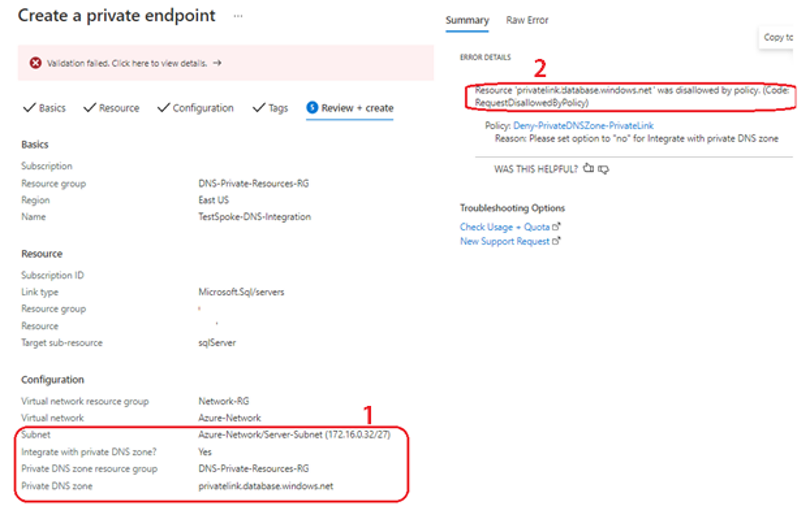
If the user tries to create a private endpoint with Private link integration, then the policy will deny creation of the resource during validation as depicted in Figure 6, the Azure Portal resource creation screen when the “Integrate with DNS private zone?” setting is set to “Yes”.

1. Integrate with Private DNS Zone is set to “Yes”.

2. Error details reference the policy that denied creation of resource, and reason.

Figure 6

Networking Solution for Ensure PaaS Resources Are Private in Your Hybrid Cloud


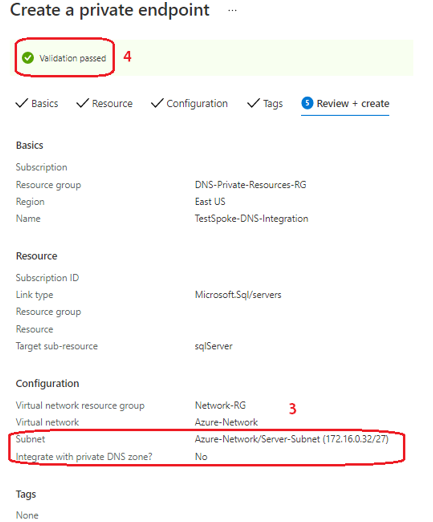
Figure 7 depicts the Azure Portal screen when the “Integrate with DNS private zone?” setting is set to “No”.

3. The setting is observed in the Networking configuration

4. Policy validation passes

Figure 7

Networking Solution for Ensure PaaS Resources Are Private in Your Hybrid Cloud

Policy 3: “Deploy If Not Exists” policy to automate DNS entries

Why: As described above, since the “Integrate with DNS private zone?” setting is set to “No”, a DNS zone for the Private Link is not created. Therefore, we need to have a method to integrate the Private Link with the centralized DNS zone of the hub. Out of the box, Azure does not provide this option during resource creation.

How: We use a Remediation policy to automate the DNS entry. Within Azure, resources that are non-compliant to a deployIfNotExists policy can be put into a compliant state through Remediation.

The Azure portal screen captures below depict the policy remediation plan:

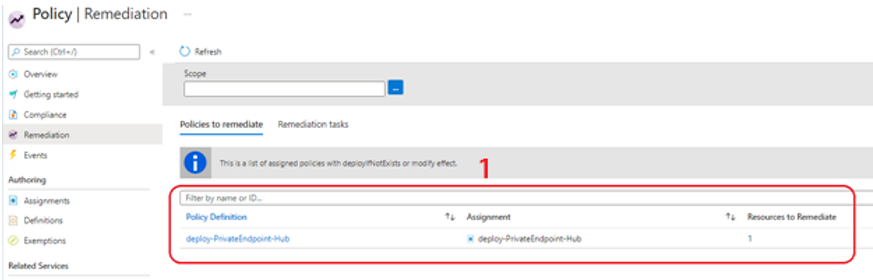
1. In Figure 8 we see the policy to remediate. The Remediation task is to automatically  add the Azure Resource DNS record to the central private DNS zone.

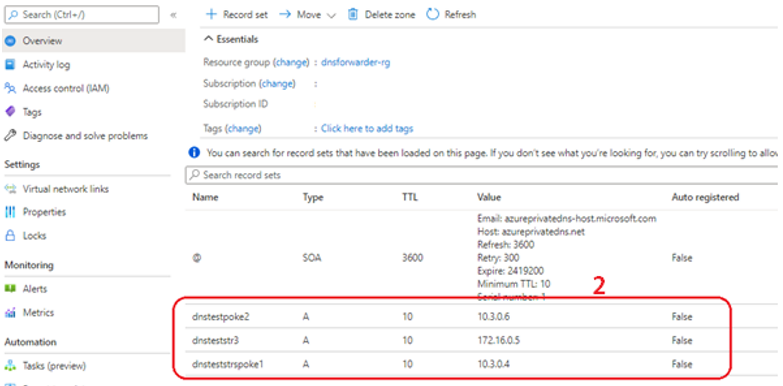
2. Figure 9 shows that the remediation policy successfully added the DNS entries on the private DNS zone for the respective Private Link DNS records.

Figure 8

Networking Solution for Ensure PaaS Resources Are Private in Your Hybrid Cloud


Figure 9

Networking Solution for Ensure PaaS Resources Are Private in Your Hybrid Cloud


Conclusion

In this article we have shown how one can securely deploy Azure PaaS resources with private endpoints. While thoughtful hybrid network planning is a given, Azure governance is an ingredient for success that is often overlooked. We hope you explore the resources provided below to learn more about Azure Private Link, how DNS in Azure is managed and how Azure Policy can automate the governance of resource creation once the network and security foundation is in place. Contact SNP Technologies here.

Resources

Simplify Cloud Security Across Hybrid & Multicloud with Azure Arc

Cloud infrastructure usage has seen tremendous growth in the past few years. As an established Microsoft Gold Partner, SNP is in a unique position where we help our customers build and manage their Cloud platform securely.

Leveraging Microsoft Azure,  we are blurring the lines between the traditional categories of platform and management as we deliver an open cloud platform that has built-in security and operations management – and can still meet the needs of our large enterprise customers.

Some of the key features that can help you monitor, secure, and manage your hybrid cloud with the broad built-in security and management capabilities are:

Azure Governance and Compliance: 

The Azure governance features help implement governance across environments, helps in creating hierarchies, applying Azure policies, creating blueprints, inventory management and optimize cost using Azure Cost management.

Azure Cost Management:

Cost management is a critical concern for many businesses, but with this feature now available for customers and partners for free, Azure spend can be managed and optimized seamlessly across Azure, AWS, and Google Cloud Platforms.

Microsoft Defender for Cloud for Hybrid Workloads:

Microsoft Defender for Cloud helps you protect all workloads running in Azure, on-premises and in other cloud platforms from cyber threats. With the recent release of new capabilities, customers can better detect and defend against advanced threats, automate and orchestrate security workflows, and streamline the investigation of threats.

Azure Auto Manage for Virtual Machines:

This feature simplifies the process of the entire VM life cycle by enrolling services like Microsoft Defender for Cloud, VM inventory, backup, VM insights, update management, change tracking, DSC, guest configuration, and more to your existing virtual machines.

End-to-End Monitoring of Applications & Infrastructure:

The new Azure monitor user experience centralizes the monitoring services together, so that you can get visibility across your infrastructure and applications. In addition, the application insights feature has been further optimized for application performance monitoring and failure diagnostics in applications.

Azure Arc – Hybrid Workload Management:

Customers can now manage their hybrid server infrastructure located on-premises or another cloud platform (AWS, Google, etc.). Azure Arc can deliver the following products and features for hybrid servers- Inventory with single plane of management experience, update management, Azure policies, Microsoft Defender for Cloud, integration of device logs with Sentinel, Azure automation, track configuration changes, auto manage for Arc enabled servers, efficiently manage Windows and Linux virtual machines in Azure, and across hybrid environments.

For more details of information on Hybrid Cloud Security & Management, contact an SNP representative


SNP’s Hybrid Cloud Adoption Framework for Azure

SNP’s Hybrid Cloud Adoption Framework for Azure provides a structured approach to help organizations transition to a hybrid cloud model effectively. This framework is designed to streamline the adoption process, ensuring alignment with business goals while leveraging the capabilities of Azure. Here’s an overview of the framework’s key components:

Assessment and Strategy Development

  • Current State Analysis: Evaluate the existing IT landscape, including applications, infrastructure, and data. Identify workloads that are suitable for migration to the cloud.
  • Business Objectives Alignment: Understand the organization’s goals, such as cost savings, scalability, or improved agility, to align the cloud strategy with overall business objectives.

Design and Architecture

  • Hybrid Architecture Blueprint: Create a detailed architecture plan that incorporates both on-premises and Azure resources. Define how data and applications will interact across environments.
  • Best Practices: Implement Azure best practices for security, compliance, and performance to ensure a robust hybrid architecture.

Migration Planning

  • Workload Prioritization: Prioritize workloads for migration based on factors like complexity, business impact, and readiness.
  • Migration Pathways: Determine the migration approach—whether lift-and-shift, refactoring, or rearchitecting—and create a detailed migration plan.

Implementation and Deployment

  • Execution: Implement the migration plan, moving workloads and data to Azure as per the established timelines.
  • Automation: Leverage Azure tools for automating deployment and configuration, reducing manual effort and minimizing errors.

Integration and Optimization

  • Seamless Integration: Ensure that on-premises systems and Azure services are integrated smoothly for consistent data flow and application performance.
  • Performance Tuning: Continuously monitor and optimize workloads in Azure to ensure they perform efficiently and meet user expectations.

Governance and Compliance

  • Policy Framework: Establish governance policies to manage resources across hybrid environments, ensuring compliance with regulatory requirements.
  • Security Posture Management: Implement Azure Security Center and other tools to monitor security and compliance across the hybrid environment.

Monitoring and Support

  • Continuous Monitoring: Use Azure Monitor and Azure Application Insights to track performance and health of both on-premises and Azure resources.
  • Support Mechanisms: Set up support structures for ongoing management, maintenance, and troubleshooting of hybrid cloud environments.

Innovation and Evolution

  • Continuous Improvement: Foster a culture of continuous improvement by regularly reviewing and updating the hybrid cloud strategy to adapt to changing business needs.
  • Emerging Technologies: Stay informed about new Azure features and services that can enhance the hybrid cloud strategy, such as AI, machine learning, and advanced analytics.

Conclusion

SNP’s Hybrid Cloud Adoption Framework for Azure provides organizations with a comprehensive roadmap for successful hybrid cloud adoption. By focusing on assessment, design, migration, integration, governance, and continuous improvement, organizations can maximize the benefits of a hybrid cloud strategy, ensuring scalability, agility, and enhanced performance while aligning with their business objectives. Contact SNP here.